4MLinux (22.0 and later) comes with a feature-rich, the lightest and the fastest server suite available on the market. For example, 512 MB of RAM is enough to setup the 4MLinux Server and to run the Chromium web browser inside this server.
Update:
The 4MLinux Server 24 (and later) is a multi-lib system running a 64-bit LAMP suite (Linux, Apache, MariaDB, and PHP). See this post for more details on this. 1. Installation.
Mount the 4MLinux Installation CD (or USB, or the ISO image downloaded by you), go to the folder named lamp, and execute the install.sh script in your terminal. Done!

Update:
4MServer 24.0 (and later) has the server software available out of the box, so there is no need anymore to run the install.sh script.
2. Web interface.
2. Web interface.
The 4MLinux Server has its own web interface, which can be opened here: Menu -> Miniserver -> MiscTools -> LAMP

Note:
Make sure that you have Firefox (or Chromium, or Opera, or SeaMonkey) installed to be able to access the interface. All these web browsers are available here: Menu -> Extensions -> NetApps. 3. Web interface: LAMP Admin.
The 4MLinux Server Web Interface consists of the following two items: LAMP Admin (http://localhost/admin) and Webmin (http://localhost:10000). LAMP Admin makes it possible to configure all the main LAMP server settings.


Note:
You will need the admin's password, which has been randomly generated and written to the file named .admin_passwd located in the root's home folder.
4. Web interface: Webmin.
Webmin (highly modified to mach the 4MLinux Server settings) ships with an eye candy theme called Authentic Theme.

Note:
Webmin requires an initial setup. The command to perform this setup is "webmin" (execute it in your terminal).
4MLinux uses the "us" keyboard layout by default. This can be changed by editing the /etc/kbd.conf file with, for example, Midnight Commander or the Webmin File Manager.


6. General server setup: system time.
4MLinux uses UTC by default. This can also be easily changed by running the tzselect script in your terminal or via the Webmin interface.

7. General server setup: users and groups.
Users and their permissions are created in real time by the scripts, which start servers. It is also possible to manage users and groups by hand using either command-line tools or the Webmin interface.
 8. General server setup: passwords.
Some passwords are randomly generated and distributed within the server if needed (see the point 3 above and the point 13 below). The root's password can be changed with the passwd command (directly or via Webmin).


Users and their permissions are created in real time by the scripts, which start servers. It is also possible to manage users and groups by hand using either command-line tools or the Webmin interface.

Some passwords are randomly generated and distributed within the server if needed (see the point 3 above and the point 13 below). The root's password can be changed with the passwd command (directly or via Webmin).

9. General server setup: custom mount points.
Custom mount points can be added by editing the system-wide configuration files (see the note below) or with Webmin. LVM and RAID devices are supported out of the box, too.


11. LAMP server: Linux.
Custom mount points can be added by editing the system-wide configuration files (see the note below) or with Webmin. LVM and RAID devices are supported out of the box, too.

Note:
The /etc/fstab file in 4MLinux is dynamically generated during each boot, so it does not make sense to edit it. Use the /etc/automount.conf and the /etc/fstab.local files instead.
10. General server setup: autostart.
By default, only a firewall and two daemons (SSH and Cron) are started during the boot. Edit the /etc/server/autostart.conf file to add more of them.
Note:
The 4MLinux Server autostart script is /usr/share/server/autostart.sh, while the system-wide autostart script in 4MLinux is /etc/init.d/autostart.sh

Updates are released monthly (usually on the first weekend of each month).
12. LAMP server: Apache.
Apache web server in 4MLinux has the PHP support enabled by default. Command-line usage: httpd start (stop, restart, test).


 Note:
Note:
Open your terminal and execute the php7 command to disable PHP5 and to enable PHP7. And vice versa: execute the php5 command to disable PHP7 and to enable PHP5.
16. Other servers: FTP.
The FTP server in 4MLinux (ProFTPD) is preconfigured to work out of the box. Command-line usage: ftpd start (stop, restart, test).
 Note:
Note:
lftp is available on the client-side. Additionally, you can try one of the following 4MLinux scripts: ftp, sftp, and fish.
17. Other servers: SMTP.
The 4MLinux Server uses Postfix with preconfigured ports (see this post) as its mail transfer agent. It comes with Procmail and Fetchmail to create a complete mail delivery system. The "smtps" support is provided by stunnel (see point 12 above). Command-line usage: smtpd start (stop, restart, test).
 Note:
Note:
By default, for security reasons, the incoming traffic (from the Internet to your server's ports: 25, 465, and 587) is blocked by the 4MLinux Firewall. You can unblock these ports by editing the /etc/firewall/config file.
18. Other servers: DNS.
 Note:
Note:
Go to the /etc/polipo directory to learn in details how the proxy server in 4MLinux works.
Go to the /etc/firewall/ddos folder to view/edit the default settings. Execute 'firewall restart' to apply changes.
26. Maintenance & security: system monitoring.
27. Maintenance & security: booting.

Note:
By default, 4MLinux uses stunnel to enable the "https" support for Apache and the "smtps" support for Postfix. Edit the /etc/stunnel/stunnel.conf to change these settings. Go to the /usr/share/stunnel/script directory if you need to generate a self-signed certificate.
By default, 4MLinux uses stunnel to enable the "https" support for Apache and the "smtps" support for Postfix. Edit the /etc/stunnel/stunnel.conf to change these settings. Go to the /usr/share/stunnel/script directory if you need to generate a self-signed certificate.
13. LAMP server: MySQL.
The 4MLinux Server incorporates the MariaDB database management system. Command-line usage: mysqld start (stop, restart, test). You can use Adminer or Webmin to create/manage your databases.

Note:
Randomly generated MySQL root's password is stored in the .mysql_passwd file located in the root's home directory. Additionally, the password is exported to Webmin, meaning that its admin uses safe (password-protected) MySQL without the need to log in manually.
14. LAMP server: PHP.
Randomly generated MySQL root's password is stored in the .mysql_passwd file located in the root's home directory. Additionally, the password is exported to Webmin, meaning that its admin uses safe (password-protected) MySQL without the need to log in manually.
14. LAMP server: PHP.
The 4MLinux Server includes both PHP5 and PHP7 (see the note below). Additionally, the ionCube Loader is enabled by default.

Open your terminal and execute the php7 command to disable PHP5 and to enable PHP7. And vice versa: execute the php5 command to disable PHP7 and to enable PHP5.
15. Other servers: SSH.
The SSH daemon in 4MLinux (OpenSSH) has the SFTP support enabled by default. Command-line usage: sshd start (stop, restart, test).
 Note:
Note:
ssh (from OpenSSH), sshfs (from FUSE), and plink with psftp (from PuTTY) are available on the client-side.

ssh (from OpenSSH), sshfs (from FUSE), and plink with psftp (from PuTTY) are available on the client-side.
16. Other servers: FTP.

lftp is available on the client-side. Additionally, you can try one of the following 4MLinux scripts: ftp, sftp, and fish.
17. Other servers: SMTP.
The 4MLinux Server uses Postfix with preconfigured ports (see this post) as its mail transfer agent. It comes with Procmail and Fetchmail to create a complete mail delivery system. The "smtps" support is provided by stunnel (see point 12 above). Command-line usage: smtpd start (stop, restart, test).

By default, for security reasons, the incoming traffic (from the Internet to your server's ports: 25, 465, and 587) is blocked by the 4MLinux Firewall. You can unblock these ports by editing the /etc/firewall/config file.
18. Other servers: DNS.
4MLinux uses BIND as its DNS server. When started, it points your name server (in
/etc/resolv.conf) to localhost. Are you still able to surf the Internet?
If so, this proves that your BIND is up and running :-) Command-line usage: dnsd start (stop, restart, test).
 Note:
Note:
By default, for security reasons, the incoming traffic (from the Internet to your server's port 53) is blocked by the 4MLinux Firewall. You can unblock this port by editing the /etc/firewall/config file.

By default, for security reasons, the incoming traffic (from the Internet to your server's port 53) is blocked by the 4MLinux Firewall. You can unblock this port by editing the /etc/firewall/config file.
19. Other servers: NFS.
20. Other servers: proxy.
The 4MLinux Server makes use of nfs-utils and rpcbind to run its NFS daemon. NFS exports can be manged manually or via Webmin (pictured below). Command-line usage: nfsd start (stop, restart, test).
 Note:
Note:
By default, for security reasons, the NFS traffic (ports: 111, 1110, 2049, 4045, 4046) is blocked by the 4MLinux Firewall. You can unblock these ports by editing the /etc/firewall/config file.

By default, for security reasons, the NFS traffic (ports: 111, 1110, 2049, 4045, 4046) is blocked by the 4MLinux Firewall. You can unblock these ports by editing the /etc/firewall/config file.
The 4MLinux Server incorporates Polipo (with an optional Tor support) as its proxy server. Polipo has its own web interface (http://localhost:8123). Command-line usage: proxy start (stop, restart, test).

Go to the /etc/polipo directory to learn in details how the proxy server in 4MLinux works.
21. Maintenance & security: firewall.
iptables can be managed with either Webmin (pictured below) or the 4MLinux Firewall. The latter has the following command-line usage: firewall start (stop, restart, test).


Note:
Do not use Webmin for iptables if you need the brute-force and DDOS protection offered by the 4MLinux Firewall (see the next two points below).
22. Maintenance & security: brute-force protection.
BRF (brute-force protection) is enabled by default in the 4MLinux Firewall. It allows only a limited number of SSH login attempts.


Note:
Go to the /etc/firewall/brf folder to view/edit the default settings. Execute 'firewall restart' to apply changes.
23. Maintenance & security: DDOS protection.
DDOS protection is disabled by default in the 4MLinux Firewall (see the picture below). When enabled, it automatically blacklists IPs/domains sending to many requests to your server.

Note:
Go to the /etc/firewall/ddos folder to view/edit the default settings. Execute 'firewall restart' to apply changes.
24. Maintenance & security: antivirus protection.
The 4MLinux Server provides its users with the ClamAV scanner. Just open your terminal and execute the antivir command.
 Note:
Note:
As you can see in the picture above, the antivir script can update both ClamAV itself and its virus signature databases, so it's quite easy to keep the antivirus software up-to-date.
25. Maintenance & security: backups.

As you can see in the picture above, the antivir script can update both ClamAV itself and its virus signature databases, so it's quite easy to keep the antivirus software up-to-date.
25. Maintenance & security: backups.
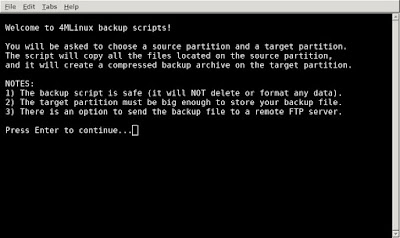
The 4MLinux backup scripts consist of the following three commands: backup (for manual backups), fsbackup (for automatic backups), and image (for disk imaging with GNU ddrescue, Partimage, and Partclone).
 Note:
Note:
The rsync utility is also included. Alternatively, the lftp tool can also be used for syncing files.

The rsync utility is also included. Alternatively, the lftp tool can also be used for syncing files.
26. Maintenance & security: system monitoring.
The 4MLinux Server includes a wide set of system monitoring tools. Just open your terminal and execute the nmonitor command.
 Note:
Note:
All the programs (listed in the picture above) use ncurses, meaning that they are correctly displayed when a remote 4MLinux Server is accessed with a SSH client.

All the programs (listed in the picture above) use ncurses, meaning that they are correctly displayed when a remote 4MLinux Server is accessed with a SSH client.
27. Maintenance & security: booting.
Webmin offers an interface to initiate the bootup and shutdown processes. 4MLinux itself supports all possible boot options: BIOS with 32-bit CPU, BIOS with 64-bit CPU, UEFI with 32-bit firmware, and UEFI with 64-bit firmware. 4MLinux can be installed on ext2, ext3, ext4, reiserfs, jfs, xfs, btrfs, and nilfs2 partitions (see this post).
 Note:
Note:
Execute the update-grub command in your terminal to install (or reinstall) GRUB with all your operating systems added to its menu (fully automatic process). Additionally, if you have UEFI, 4MLinux will ask you whether to install rEFInd for you.

Execute the update-grub command in your terminal to install (or reinstall) GRUB with all your operating systems added to its menu (fully automatic process). Additionally, if you have UEFI, 4MLinux will ask you whether to install rEFInd for you.
